
Another day, another packet challenge. For this particular challenge I’m looking for 2 things:
1) Name the exploit that was used to compromise the system.
2) Tell me what was done to system after it was compromised.
Because of the number of packets in this challenge, I’ve decided to make the capture files available for download. While this means we won’t get to experience pure joy that comes from using a fine tool such as text2pcap, I’m sure no one would look forward to converting 60+ packets.
The capture file can be download from the I Smell Packets Google group located at the following URL:
http://groups.google.com/group/ismellpackets
The filename is:
7.pcap
Send you answers to chris (dot) christianson (at) gmail (dot) com.
I for one had a lot of fun with this week’s challenge. There were packets, magic, and even some shifting. Everything you need in a good packet challenge. Here’s the solution from the creator of the challenge Davy Douhine (@ddouhine on twitter.)
Davy writes:
1. Paste the packet in a text file.
2. Add “0000” at the beginning of each line, manually or with sed:
sed 's/^/0000 /' packet.txt
3. Print the result and copy it.
4. Launch scapy.
5. Import the packet in an object. To do this use the import_hexcap command, paste the packet, and hit CTRL-D:
>>> p1=IP(import_hexcap())
0000 4500 00c8 21c4 4000 8006 dee4 c0a8 3c01
0000 c0a8 3c35 0014 0841 ea5d efe1 32e0 3fa1
0000 5018 ffff 2c6d 0000 1f8b 0808 d92d 074a
0000 0203 6669 6c65 005d 8ecb 9104 210c 43ef
0000 1385 4210 fe01 e1b8 7ae8 fc43 1871 d8cb
0000 faa0 924b cf82 4812 6419 3aaa e5b4 2e8e
0000 81fd ec8d 87bd e00f c79f f344 767d 41a3
0000 098e 034f f31b 0c39 3f88 9e89 3a46 18dd
0000 af28 706f f8f0 82f7 5db7 d2d0 fc17 634c
0000 54d6 914c 43ed 72c4 532f 6a72 c329 4925
0000 48cb db9c 8564 2cc4 1baf b81c 7a5c cde9
0000 b7af f4b5 5882 c5f9 45c4 852e 62b1 3f3f
0000 c173 e305 f500 0000
6. Display the “p1” object:
>>> p1.display()
###[ IP ]###
  version= 4L
  ihl= 5L
  tos= 0x0
  len= 200
  id= 8644
  flags= DF
  frag= 0L
  ttl= 128
  proto= tcp
  chksum= 0xdee4
  src= 192.168.60.1
  dst= 192.168.60.53
  options= ''
###[ TCP ]###
     sport= ftp_data
     dport= 2113
     seq= 3932024801L
     ack= 853557153L
     dataofs= 5L
     reserved= 0L
     flags= PA
     window= 65535
     chksum= 0x2c6d
     urgptr= 0
     options= []
###[ Raw ]###
        load= '\x1f\x8b\x08\x08\xd9-\x07J\x02\x03file\x00]\x8e\xcb\x91\x04!\x0cC\xef\x13\x85B\x10\xfe\x01\xe1\xb8z\xe8\xfcC\x18q\xd8\xcb\xfa\xa0\x92K\xcf\x82H\x12d\x19:\xaa\xe5\xb4.\x8e\x81\xfd\xec\x8d\x87\xbd\xe0\x0f\xc7\x9f\xf3Dv}A\xa3\t\x8e\x03O\xf3\x1b\x0c9?\x88\x9e\x89:F\x18\xdd\xaf(po\xf8\xf0\x82\xf7]\xb7\xd2\xd0\xfc\x17cLT\xd6\x91LC\xedr\xc4S/jr\xc3)I%H\xcb\xdb\x9c\x85d,\xc4\x1b\xaf\xb8\x1cz\\\xcd\xe9\xb7\xaf\xf4\xb5X\x82\xc5\xf9E\xc4\x85.b\xb1??\xc1s\xe3\x05\xf5\x00\x00\x00'
7. We now have a good looking packet. The TCP source port indicates that this should be a ftp-data transfer. In the payload we see the string “file.” This is the name of the file that was transfered. Let’s take a closer look at it.
8. Display the payload of the packet:
>>> a.payload.payload
<Raw  load='\x08\x08\xd9-\x07J\x02\x03file\x00]\x8e\xcb\x91\x04!\x0cC\xef\x13\x85B\x10\xfe\x01\xe1\xb8z\xe8\xfcC\x18q\xd8\xcb\xfa\xa0\x92K\xcf\x82H\x12d\x19:\xaa\xe5\xb4.\x8e\x81\xfd\xec\x8d\x87\xbd\xe0\x0f\xc7\x9f\xf3Dv}A\xa3\t\x8e\x03O\xf3\x1b\x0c9?\x88\x9e\x89:F\x18\xdd\xaf(po\xf8\xf0\x82\xf7]\xb7\xd2\xd0\xfc\x17cLT\xd6\x91LC\xedr\xc4S/jr\xc3)I%H\xcb\xdb\x9c\x85d,\xc4\x1b\xaf\xb8\x1cz\\\xcd\xe9\xb7\xaf\xf4\xb5X\x82\xc5\xf9E\xc4\x85.b\xb1??\xc1s\xe3\x05\xf5\x00\x00\x00' |>
9. Convert the payload from raw to string and put the result in an object:
>>> strpayload=str(a.payload.payload)
'\x1f\x8b\x08\x08\xd9-\x07J\x02\x03file\x00]\x8e\xcb\x91\x04!\x0cC\xef\x13\x85B\x10\xfe\x01\xe1\xb8z\xe8\xfcC\x18q\xd8\xcb\xfa\xa0\x92K\xcf\x82H\x12d\x19:\xaa\xe5\xb4.\x8e\x81\xfd\xec\x8d\x87\xbd\xe0\x0f\xc7\x9f\xf3Dv}A\xa3\t\x8e\x03O\xf3\x1b\x0c9?\x88\x9e\x89:F\x18\xdd\xaf(po\xf8\xf0\x82\xf7]\xb7\xd2\xd0\xfc\x17cLT\xd6\x91LC\xedr\xc4S/jr\xc3)I%H\xcb\xdb\x9c\x85d,\xc4\x1b\xaf\xb8\x1cz\\\xcd\xe9\xb7\xaf\xf4\xb5X\x82\xc5\xf9E\xc4\x85.b\xb1??\xc1s\xe3\x05\xf5\x00\x00\x00'
10. Put it in a file:
>>> fd=open('/tmp/file', 'w')
>>> fd.write(strpayload)
>>> fd.close()
11. Use file magic to guess what sort of file it is:
>>> os.system('file /tmp/file')
/tmp/file: gzip compressed data, was "file", from Unix, max compression
12. It’s a gzip file, decompress it:
>>> fd=gzip.open('/tmp/file', 'r')
>>> fd.read()
'4500 0062 a46a 0000 8011 9c99 c0a8 3c01 c0a8 3c35 5a6d 0202 004e 3523 3c31 353e 4a75 6e20 2033 2031 333a 3136 3a31 3920 4444 4444 4444 4444 2047 656e 6572 6963 4c6f 6709 3009 5657 5253 2056 5048 4f4f 4c51 4a20 5344 464e 4857 2053 4f48 4456 480a\n'
13. So we have a text file with some hex in it that begins with “45…”. Oh no, it’s another packet… 😉 Let’s format it so that it can be imported into scapy. This requires 16 bytes per line with 0000 at the beginning of each. Question for the audience. Does anybody know how to do this in python?
>>> extractedpacket=_
>>> fd.close()
>>> fd=open('/tmp/extpkt', 'w')
>>> fd.write(extractedpacket)
>>> fd.close()
>>> os.system('vi /tmp/extpkt')
>>> os.system("sed 's/^/0000 /' /tmp/extpkt")
0000 4500 0062 a46a 0000 8011 9c99 c0a8 3c01
0000 c0a8 3c35 5a6d 0202 004e 3523 3c31 353e
0000 4a75 6e20 2033 2031 333a 3136 3a31 3920
0000 4444 4444 4444 4444 2047 656e 6572 6963
0000 4c6f 6709 3009 5657 5253 2056 5048 4f4f
0000 4c51 4a20 5344 464e 4857 2053 4f48 4456
0000 480a
14. Import the packet to scapy using import_hexcap:
>>> p2=IP(import_hexcap())
0000 4500 0062 a46a 0000 8011 9c99 c0a8 3c01
0000 c0a8 3c35 5a6d 0202 004e 3523 3c31 353e
0000 4a75 6e20 2033 2031 333a 3136 3a31 3920
0000 4444 4444 4444 4444 2047 656e 6572 6963
0000 4c6f 6709 3009 5657 5253 2056 5048 4f4f
0000 4c51 4a20 5344 464e 4857 2053 4f48 4456
0000 480a
15. Display the packet details:
>>> p2.display()
###[ IP ]###
  version= 4L
  ihl= 5L
  tos= 0x0
  len= 98
  id= 42090
  flags=
  frag= 0L
  ttl= 128
  proto= udp
  chksum= 0x9c99
  src= 192.168.60.1
  dst= 192.168.60.53
  options= ''
###[ UDP ]###
     sport= 23149
     dport= syslog
     len= 78
     chksum= 0x3523
###[ Raw ]###
        load= 'Jun  3 13:16:19 DDDDDDDD GenericLog\t0\tVWRS VPHOOLQJ SDFNHW SOHDVH\n'
16. We now have a packet containing a syslog message and there are some weird characters in it, “VWRS VPHOOLQJ SDFNHW SOHDVH”.
17. What was the name of that challenge? Caesar’s challenge… hmm… After a quick search we find something called the Caesar cipher. The Caesar cipher is a 2000 year old encryption technique named after Julius Caesar. It is a type of substitution cipher that shifts the characters 3 places.
18. Let’s try it. Shifting the characters in the syslog message by 3 we get: “STOP SMELLING PACKET PLEASE”.
Chris adds:
Thanks to Davy for coming up this week’s challenge. It was fun for me to have the opportunity to work on a challenge for once. If anyone else ever has an idea, let me know and maybe we’ll post it.
Lot’s of people got this one right. Congratulations to Alec Waters (@alecwaters on twitter) for being the first. Thanks to everyone else for playing.
Until next time.
The following are some links to more information about this week’s challenge:
Magic number (programming)
file (Unix)
Caesar cipher
Filed under: Packet Challenge
Here’s another packet challenge for you all and this one is a real doozy. It was sent to me by Davy Douhine, (@ddouhine on twitter) winner of the last challenge. I think your going to have a good time pulling this one apart. Enjoy.
4500 00c8 21c4 4000 8006 dee4 c0a8 3c01
c0a8 3c35 0014 0841 ea5d efe1 32e0 3fa1
5018 ffff 2c6d 0000 1f8b 0808 d92d 074a
0203 6669 6c65 005d 8ecb 9104 210c 43ef
1385 4210 fe01 e1b8 7ae8 fc43 1871 d8cb
faa0 924b cf82 4812 6419 3aaa e5b4 2e8e
81fd ec8d 87bd e00f c79f f344 767d 41a3
098e 034f f31b 0c39 3f88 9e89 3a46 18dd
af28 706f f8f0 82f7 5db7 d2d0 fc17 634c
54d6 914c 43ed 72c4 532f 6a72 c329 4925
48cb db9c 8564 2cc4 1baf b81c 7a5c cde9
b7af f4b5 5882 c5f9 45c4 852e 62b1 3f3f
c173 e305 f500 0000
Email chris(dot)christianson@gmail(dot)com with the answer.
We left off the answer to our challenge last time with a pcap file containing 4 packets. Still not knowing what Fred’s secret was, let’s continue.
Opening the file with Wireshark shows the following:
tshark -nr 5.pcap
  1   0.000000 192.168.94.129 -> 192.168.94.128 SMB Session Setup AndX Response, NTLMSSP_CHALLENGE, Error: STATUS_MORE_PROCESSING_REQUIRED
  2  19.000000 192.168.94.128 -> 192.168.94.129 SMB Session Setup AndX Request, NTLMSSP_AUTH, User: wilma\fred
  3  39.000000 192.168.94.129 -> 192.168.94.128 SMB Session Setup AndX Response
  4 296.000000 192.168.94.128 -> 192.168.94.129 SMB [TCP Retransmission] Session Setup AndX Request, NTLMSSP_NEGOTIATE
The reason tshark is used here is that it has the ability to decode Server Message Block (SMB) traffic. Tshark is basiclly a command-line version of Wireshark. Anyways, right away we see that there is a challenge, authentication, and a response. This is Fred logging into a Windows system.
Tshark can display much more information about these packets by using the -V switch. Here is just a snippet of the output:
tshark -Vnr 5.pcap
…
                        .... .... .... .... .0.. .... .... .... = Negotiate This is Local Call: Not set
                        .... .... .... .... ..0. .... .... .... = Negotiate Workstation Supplied: Not set
                        .... .... .... .... ...0 .... .... .... = Negotiate Domain Supplied: Not set
                        .... .... .... .... .... 0... .... .... = Negotiate Anonymous: Not set
                        .... .... .... .... .... .0.. .... .... = Negotiate 0x00000400: Not set
                        .... .... .... .... .... ..1. .... .... = Negotiate NTLM key: Set
                        .... .... .... .... .... ...0 .... .... = Negotiate Netware: Not set
                        .... .... .... .... .... .... 0... .... = Negotiate Lan Manager Key: Not set
                        .... .... .... .... .... .... .0.. .... = Negotiate Datagram Style: Not set
                        .... .... .... .... .... .... ..0. .... = Negotiate Seal: Not set
                        .... .... .... .... .... .... ...0 .... = Negotiate Sign: Not set
                        .... .... .... .... .... .... .... 0... = Request 0x00000008: Not set
                        .... .... .... .... .... .... .... .1.. = Request Target: Set
                        .... .... .... .... .... .... .... ..0. = Negotiate OEM: Not set
                        .... .... .... .... .... .... .... ...1 = Negotiate UNICODE: Set
                    NTLM Challenge: 89234201B1621ED1
                    Reserved: 0000000000000000
                    Address List
                        Length: 60
                        Maxlen: 60
                        Offset: 66
                        Domain NetBIOS Name: WILMA
                            Target item type: NetBIOS domain name (0x0002)
                            Target item Length: 10
                            Target item Content: WILMA
                        Server NetBIOS Name: WILMA
…
The portion of the packet highlighted above contains the NTLM Challenge. There are also some hashes in the other packets. This is all the information needed to find out Fred’s secret password.
The easiest way to go about this is to use Cain. Cain is a Windows based password cracking tool available for free. To crack Fred’s password with Cain follow these steps:
1. Open the 5.pcap file with Cain. A SMB password will appear under the Passwords on the Sniffer tab.
2. Right click the password and Send to Cracker.

3. Click the Cracker tab.
4. Select the user and scroll all the way over to the right and notice the Type of password. This is a NTLM Session Security password.
5. Right click the User name and select either a Brute-Force or a Dictionary Attack. Both will work.
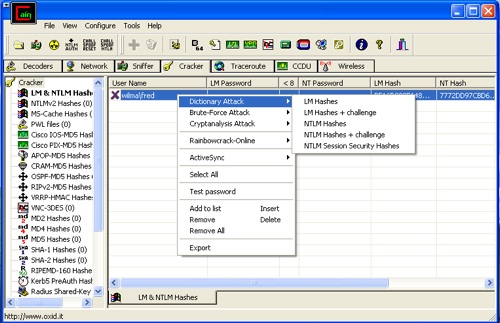
6. As we just saw, the type of password we are trying to crack is a NTLM Session Security password. Select NTLM Session Security.
If you choose to do a Dictionary attack, use Cain’s default wordlist. The wordlist is located in C:\Program Files\Cain\Wordlists.
7. Click the Start button.
After a short time, no more than a minute or two, the password will be cracked. In this case the plaintext of user wilma\fred is betty. I always thought Fred might have a thing for Betty, she’s much hotter.
Congratulations goes to Davy Douhine (@ddouhine on twitter) for being the first to solve this challenge. Davy used scapy, Cain, and brute-force to figure out Fred’s Secret. He also sent me a fun little challenge to figure out. We’ll share that with you next week.
Thanks everyone for playing.
Here are links to some information referenced in this challenge:
Tshark
NTLM – Wikipedia
Security Watch: The Most Misunderstood Windows Security of All Time
Windows Passwords: Everything You Need To Know
Cain & Able
This challenge was a little harder than the previous ones. It seems a lot of people had a hard time taking the hex dump of the packets and converting them into pcap format. So, what I decided to do was break the answer to Fred’s Secret into a couple of different posts. Part 1 will describe how to convert the packets. In Part 2 we’ll go ahead and reveal the solution. This way everyone will still be able to try to find out the answer themselves.
Here are the four packets:
00 0c 29 4c 6d a6 00 0c 29 0e 66 bd 08 00 45 00
00 f6 04 38 40 00 80 06 b7 77 c0 a8 5e 80 c0 a8
5e 81 0d 0d 01 bd 42 d0 33 b5 d2 64 26 85 50 18
fa 97 0e ae 00 00 00 00 00 ca ff 53 4d 42 73 00
00 00 00 18 07 c8 00 00 00 00 00 00 00 00 00 00
00 00 00 00 ff fe 00 00 10 00 0c ff 00 ca 00 04
11 0a 00 00 00 00 00 00 00 28 00 00 00 00 00 d4
00 00 a0 8f 00 4e 54 4c 4d 53 53 50 00 01 00 00
00 07 82 08 a2 00 00 00 00 00 00 00 00 00 00 00
00 00 00 00 00 05 01 28 0a 00 00 00 0f 00 57 00
69 00 6e 00 64 00 6f 00 77 00 73 00 20 00 32 00
30 00 30 00 32 00 20 00 53 00 65 00 72 00 76 00
69 00 63 00 65 00 20 00 50 00 61 00 63 00 6b 00
20 00 33 00 20 00 32 00 36 00 30 00 30 00 00 00
57 00 69 00 6e 00 64 00 6f 00 77 00 73 00 20 00
32 00 30 00 30 00 32 00 20 00 35 00 2e 00 31 00
00 00 00 00


00 0c 29 0e 66 bd 00 0c 29 4c 6d a6 08 00 45 00
01 1f 00 9f 40 00 80 06 ba e7 c0 a8 5e 81 c0 a8
5e 80 01 bd 0d 0d d2 64 26 85 42 d0 34 83 50 18
f9 99 80 50 00 00 00 00 00 f3 ff 53 4d 42 73 16
00 00 c0 98 07 c8 00 00 00 00 00 00 00 00 00 00
00 00 00 00 ff fe 00 08 10 00 04 ff 00 f3 00 00
00 7e 00 c8 00 4e 54 4c 4d 53 53 50 00 02 00 00
00 0a 00 0a 00 38 00 00 00 05 82 8a a2 89 23 42
01 b1 62 1e d1 00 00 00 00 00 00 00 00 3c 00 3c
00 42 00 00 00 05 01 28 0a 00 00 00 0f 57 00 49
00 4c 00 4d 00 41 00 02 00 0a 00 57 00 49 00 4c
00 4d 00 41 00 01 00 0a 00 57 00 49 00 4c 00 4d
00 41 00 04 00 0a 00 57 00 49 00 4c 00 4d 00 41
00 03 00 0a 00 57 00 49 00 4c 00 4d 00 41 00 00
00 00 00 14 57 00 69 00 6e 00 64 00 6f 00 77 00
73 00 20 00 35 00 2e 00 31 00 00 00 57 00 69 00
6e 00 64 00 6f 00 77 00 73 00 20 00 32 00 30 00
30 00 30 00 20 00 4c 00 41 00 4e 00 20 00 4d 00
61 00 6e 00 61 00 67 00 65 00 72 00 00


00 0c 29 4c 6d a6 00 0c 29 0e 66 bd 08 00 45 00
01 60 04 39 40 00 80 06 b7 0c c0 a8 5e 80 c0 a8
5e 81 0d 0d 01 bd 42 d0 34 83 d2 64 27 7c 50 18
f9 a0 09 36 00 00 00 00 01 34 ff 53 4d 42 73 00
00 00 00 18 07 c8 00 00 00 00 00 00 00 00 00 00
00 00 00 00 ff fe 00 08 20 00 0c ff 00 34 01 04
11 0a 00 00 00 00 00 00 00 92 00 00 00 00 00 d4
00 00 a0 f9 00 4e 54 4c 4d 53 53 50 00 03 00 00
00 18 00 18 00 62 00 00 00 18 00 18 00 7a 00 00
00 0a 00 0a 00 48 00 00 00 08 00 08 00 52 00 00
00 08 00 08 00 5a 00 00 00 00 00 00 00 92 00 00
00 05 82 88 a2 05 01 28 0a 00 00 00 0f 77 00 69
00 6c 00 6d 00 61 00 66 00 72 00 65 00 64 00 46
00 52 00 45 00 44 00 be 16 d3 98 51 48 ba f5 00
00 00 00 00 00 00 00 00 00 00 00 00 00 00 00 77
72 dd 97 cb d6 6f 8d c7 ca db e1 88 6b c3 2b cc
83 df 15 dc 6e 98 41 00 57 00 69 00 6e 00 64 00
6f 00 77 00 73 00 20 00 32 00 30 00 30 00 32 00
20 00 53 00 65 00 72 00 76 00 69 00 63 00 65 00
20 00 50 00 61 00 63 00 6b 00 20 00 33 00 20 00
32 00 36 00 30 00 30 00 00 00 57 00 69 00 6e 00
64 00 6f 00 77 00 73 00 20 00 32 00 30 00 30 00
32 00 20 00 35 00 2e 00 31 00 00 00 00 00


00 0c 29 0e 66 bd 00 0c 29 4c 6d a6 08 00 45 00
00 a1 00 a0 40 00 80 06 bb 64 c0 a8 5e 81 c0 a8
5e 80 01 bd 0d 0d d2 64 27 7c 42 d0 35 bb 50 18
f8 61 c6 aa 00 00 00 00 00 75 ff 53 4d 42 73 00
00 00 00 98 07 c8 00 00 00 00 00 00 00 00 00 00
00 00 00 00 ff fe 00 08 20 00 04 ff 00 75 00 00
00 00 00 4a 00 82 57 00 69 00 6e 00 64 00 6f 00
77 00 73 00 20 00 35 00 2e 00 31 00 00 00 57 00
69 00 6e 00 64 00 6f 00 77 00 73 00 20 00 32 00
30 00 30 00 30 00 20 00 4c 00 41 00 4e 00 20 00
4d 00 61 00 6e 00 61 00 67 00 65 00 72 00 00
Converting the Hex Dump into PCAP using tr, sed, text2pcap, & mergecap.
There are a number of different ways to convert a hex dump into pcap. The method I will demonstrate here will be using the tr, sed, text2pcap, and mergecap commands. This is going to be long and drawn out, perhaps even a little painful. By doing it this way though, we are going to get use a number of different commands. Using these different commands will allow us to see what they do and become familiar with their syntax and how they work. As we go through each step in the process, take a look at the output of the command and try to get a feel of what it is actually doing.
To begin, copy and paste each of the packets into a separate text file (for example 1.txt, 2.txt, 3.txt, 4.txt.)
Then, remove the carriage returns:
tr -d '\n' 1b.txt
Next, get rid of the blank spaces:
sed 's/ //g' 1c.txt
Now, separate the bytes:
sed 's/\(..\)/\1 /g' 1d.txt
Then, prepend a’00000 ‘:
sed 's/^/00000 /' 1e.txt
Finally, convert the hex to pcap using text2pcap:
text2pcap 1e.txt 1f.pcap
All of this can be done on a single line by piping the output of one command into the input of the next command:
tr -d '\n' < 1.txt | sed 's/ //g' | sed 's/\(..\)/\1 /g' | sed 's/^/00000 /' | text2pcap - 1f.pcap
Repeat this process for each of the each of the four packets. Afterwords there should be four pcap files: 1f.pcap, 2f.pcap, 3f.pcap, and 4f.pcap. These four packets now need to combined back into a single file. This can be done using mergecap:
mergecap -w 5.pcap 1f.pcap 2f.pcap 3f.pcap 4f.pcap
If everything worked correctly, the file 5.pcap now contains four packets. To verify this, run tcpdump. Use the -v (verbose) switch to display the length of each packet. This is highlighted below:
tcpdump -nnvr 5.pcap
reading from file 5.pcap, link-type EN10MB (Ethernet)
14:13:33.000000 IP (tos 0x0, ttl 128, id 159, offset 0, flags [DF], proto TCP (6), length 287) 192.168.94.129.445 > 192.168.94.128.3341: P, cksum 0x8050 (correct), 3529778821:3529779068(247) ack 1120941187 win 63897
14:13:52.000000 IP (tos 0x0, ttl 128, id 1081, offset 0, flags [DF], proto TCP (6), length 352) 192.168.94.128.3341 > 192.168.94.129.445: P, cksum 0x0936 (correct), 1:313(312) ack 247 win 63904
14:14:12.000000 IP (tos 0x0, ttl 128, id 160, offset 0, flags [DF], proto TCP (6), length 161) 192.168.94.129.445 > 192.168.94.128.3341: P, cksum 0xc6aa (correct), 247:368(121) ack 313 win 63585
14:18:29.000000 IP (tos 0x0, ttl 128, id 1080, offset 0, flags [DF], proto TCP (6), length 246) 192.168.94.128.3341 > 192.168.94.129.445: P, cksum 0x0eae (correct), 4294967091:1(206) ack 0 win 64151
Remember, the reason for going through this long drawn out process was to demonstrate the use of a number of different commands and how they work. With this knowledge, hopefully we’ll have a better understanding of how to use each of these tools. Perhaps we can even begin writing scripts that automate such processes. 🙂
At the onset I also mentioned that there were a number of other ways to convert a hex dump to pcap. Anyone interested in writing something up on how to use scapy or any another tool to convert the hex dump? If so, let me know and we’ll post it.
Now, it’s back up to you again. What’s Fred’s secret?
Hint: You are going to have to use some brute-force.
The following are links to information on the the use of the tr, sed, text2pcap, and mergecap commands:
tr (Unix)
USEFUL ONE-LINE SCRIPTS FOR SED
text2pcap
mergecap
Tired of trying to convert the hex dump to pcap? Here is a link to the I Smell Packets Group on Google. Download the 5.pcap file.
http://groups.google.com/group/ismellpackets
Filed under: Packet Challenge
Hey there challenge fans! Here is another packet challenge for you. This one consists of 4 packets that are just too big to tweet. To win all you have to do is figure out what Fred’s secret is. Email chris . christianson @ gmail . com with the answer.
00 0c 29 4c 6d a6 00 0c 29 0e 66 bd 08 00 45 00
00 f6 04 38 40 00 80 06 b7 77 c0 a8 5e 80 c0 a8
5e 81 0d 0d 01 bd 42 d0 33 b5 d2 64 26 85 50 18
fa 97 0e ae 00 00 00 00 00 ca ff 53 4d 42 73 00
00 00 00 18 07 c8 00 00 00 00 00 00 00 00 00 00
00 00 00 00 ff fe 00 00 10 00 0c ff 00 ca 00 04
11 0a 00 00 00 00 00 00 00 28 00 00 00 00 00 d4
00 00 a0 8f 00 4e 54 4c 4d 53 53 50 00 01 00 00
00 07 82 08 a2 00 00 00 00 00 00 00 00 00 00 00
00 00 00 00 00 05 01 28 0a 00 00 00 0f 00 57 00
69 00 6e 00 64 00 6f 00 77 00 73 00 20 00 32 00
30 00 30 00 32 00 20 00 53 00 65 00 72 00 76 00
69 00 63 00 65 00 20 00 50 00 61 00 63 00 6b 00
20 00 33 00 20 00 32 00 36 00 30 00 30 00 00 00
57 00 69 00 6e 00 64 00 6f 00 77 00 73 00 20 00
32 00 30 00 30 00 32 00 20 00 35 00 2e 00 31 00
00 00 00 00


00 0c 29 0e 66 bd 00 0c 29 4c 6d a6 08 00 45 00
01 1f 00 9f 40 00 80 06 ba e7 c0 a8 5e 81 c0 a8
5e 80 01 bd 0d 0d d2 64 26 85 42 d0 34 83 50 18
f9 99 80 50 00 00 00 00 00 f3 ff 53 4d 42 73 16
00 00 c0 98 07 c8 00 00 00 00 00 00 00 00 00 00
00 00 00 00 ff fe 00 08 10 00 04 ff 00 f3 00 00
00 7e 00 c8 00 4e 54 4c 4d 53 53 50 00 02 00 00
00 0a 00 0a 00 38 00 00 00 05 82 8a a2 89 23 42
01 b1 62 1e d1 00 00 00 00 00 00 00 00 3c 00 3c
00 42 00 00 00 05 01 28 0a 00 00 00 0f 57 00 49
00 4c 00 4d 00 41 00 02 00 0a 00 57 00 49 00 4c
00 4d 00 41 00 01 00 0a 00 57 00 49 00 4c 00 4d
00 41 00 04 00 0a 00 57 00 49 00 4c 00 4d 00 41
00 03 00 0a 00 57 00 49 00 4c 00 4d 00 41 00 00
00 00 00 14 57 00 69 00 6e 00 64 00 6f 00 77 00
73 00 20 00 35 00 2e 00 31 00 00 00 57 00 69 00
6e 00 64 00 6f 00 77 00 73 00 20 00 32 00 30 00
30 00 30 00 20 00 4c 00 41 00 4e 00 20 00 4d 00
61 00 6e 00 61 00 67 00 65 00 72 00 00


00 0c 29 4c 6d a6 00 0c 29 0e 66 bd 08 00 45 00
01 60 04 39 40 00 80 06 b7 0c c0 a8 5e 80 c0 a8
5e 81 0d 0d 01 bd 42 d0 34 83 d2 64 27 7c 50 18
f9 a0 09 36 00 00 00 00 01 34 ff 53 4d 42 73 00
00 00 00 18 07 c8 00 00 00 00 00 00 00 00 00 00
00 00 00 00 ff fe 00 08 20 00 0c ff 00 34 01 04
11 0a 00 00 00 00 00 00 00 92 00 00 00 00 00 d4
00 00 a0 f9 00 4e 54 4c 4d 53 53 50 00 03 00 00
00 18 00 18 00 62 00 00 00 18 00 18 00 7a 00 00
00 0a 00 0a 00 48 00 00 00 08 00 08 00 52 00 00
00 08 00 08 00 5a 00 00 00 00 00 00 00 92 00 00
00 05 82 88 a2 05 01 28 0a 00 00 00 0f 77 00 69
00 6c 00 6d 00 61 00 66 00 72 00 65 00 64 00 46
00 52 00 45 00 44 00 be 16 d3 98 51 48 ba f5 00
00 00 00 00 00 00 00 00 00 00 00 00 00 00 00 77
72 dd 97 cb d6 6f 8d c7 ca db e1 88 6b c3 2b cc
83 df 15 dc 6e 98 41 00 57 00 69 00 6e 00 64 00
6f 00 77 00 73 00 20 00 32 00 30 00 30 00 32 00
20 00 53 00 65 00 72 00 76 00 69 00 63 00 65 00
20 00 50 00 61 00 63 00 6b 00 20 00 33 00 20 00
32 00 36 00 30 00 30 00 00 00 57 00 69 00 6e 00
64 00 6f 00 77 00 73 00 20 00 32 00 30 00 30 00
32 00 20 00 35 00 2e 00 31 00 00 00 00 00


00 0c 29 0e 66 bd 00 0c 29 4c 6d a6 08 00 45 00
00 a1 00 a0 40 00 80 06 bb 64 c0 a8 5e 81 c0 a8
5e 80 01 bd 0d 0d d2 64 27 7c 42 d0 35 bb 50 18
f8 61 c6 aa 00 00 00 00 00 75 ff 53 4d 42 73 00
00 00 00 98 07 c8 00 00 00 00 00 00 00 00 00 00
00 00 00 00 ff fe 00 08 20 00 04 ff 00 75 00 00
00 00 00 4a 00 82 57 00 69 00 6e 00 64 00 6f 00
77 00 73 00 20 00 35 00 2e 00 31 00 00 00 57 00
69 00 6e 00 64 00 6f 00 77 00 73 00 20 00 32 00
30 00 30 00 30 00 20 00 4c 00 41 00 4e 00 20 00
4d 00 61 00 6e 00 61 00 67 00 65 00 72 00 00
Here is the solution to Packet Challenge #2 and how I created it.
I mentioned it last time and I’ll mention it again here, the problem with posting these challenges to Twitter is keeping them to 140 characters or less. It’d be nice if Twitter could increase the size of tweets a bit more. That way I could at least get some good TCP packets moving over this thing.
Anyways, since the size of tweets is such an issue. I decided to do the same thing a router has to do when it has a packet that’s too big to shove down the wire. I fragmented it. While I was cutting it in to little pieces, I also took the time to rearrange it a little.
I used the same tools as in the previous challenge (hping and tcpdump.) However, I needed the help of one more tool to perform the actual fragmentation. I chose a nifty little tool called Fragroute.
Fragroute was created by Dug Song (@dugsong on twitter.) It has the ability to take traffic destined for a particular host and do all sorts of things with it. It can delay, duplicate, drop, fragment, overlap, reorder, etc. It was created primarily to test network based intrusion detection systems, firewalls, and IP stack behavior.
Fragroute can be downloaded here.
To create the packet I did the following:
First, I created a text file with the payload. Then I ran hping as follows:
hping3 –icmp –file payload-2.txt –data 17 192.168.94.134 –c 1
Here is the output from hping:
HPING 192.168.94.134 (eth0 192.168.94.134): icmp mode set, 28 headers + 17 data bytes
[main] memlockall(): Success
Warning: can’t disable memory paging!
len=46 ip=192.168.94.134 ttl=128 id=6852 icmp_seq=0 rtt=1.0 ms
— 192.168.94.134 hping statistic —
1 packets tramitted, 1 packets received, 0% packet loss
round-trip min/avg/max = 1.0/1.0/1.0 ms
At the same time as I ran hping, in another window I ran fragroute to fragment and reorder the packet:
fragroute -f frag-3 192.168.94.1
Here is the output from fragroute:
fragroute: ip_frag -> order -> print
192.168.94.129 > 192.168.94.1: (frag 61058:8@16+)
192.168.94.129 > 192.168.94.1: icmp: type 8 code 0 (frag 61058:8@0+)
192.168.94.129 > 192.168.94.1: (frag 61058:1@24)
192.168.94.129 > 192.168.94.1: (frag 61058:8@8+)
What the fragroute command is basically saying is to modify traffic going to this destination. In this case, the destination is 192.168.94.1. The -f option allows for the specifying of rules. I chose to use one of the rule files that came with fragroute. It is located in the scripts directory.
Here is the frag-3 file:
ip_frag 8
order random
print
Note that hping created 1 packet. Now look at the output from fragroute. Fragroute took that packet and broke it up into four smaller pieces. Fragments!
Something else to note here is that the IP ID is different. In the packet created by hping the IP ID is 6852. In the output from fragroute the IP ID is 61058. This is because in order to perform this packet manipulation, fragroute actually had to rewrite the packet. The significance of the IP ID field will be discussed more later.
Here are the packets:
45 00 00 1c ee 82 20 02 40 01 2e 89 c0 a8 5e 81 c0 a8 5e 01 63 6b 65 74 73 2e 63 6f
45 00 00 1c ee 82 20 00 40 01 2e 8b c0 a8 5e 81 c0 a8 5e 01 08 00 f8 bb 3f 1f 00 00
45 00 00 15 ee 82 00 03 40 01 4e 8f c0 a8 5e 81 c0 a8 5e 01 6d
45 00 00 1c ee 82 20 01 40 01 2e 8a c0 a8 5e 81 c0 a8 5e 01 69 73 6d 65 6c 6c 70 61
This is the beginning of the IP Header portion of the packet. I removed the ethernet frame header to keep it small enough for Twitter. I also removed the | to make it easier to read here. Building upon the last packet challenge here is a quick dissect.
Starting with byte 0, we see that familiar 45. This is an IP Version 4 packet and the IP Header is 20 bytes in length. In the Protocol Field, found in byte 9, there is a 01, so this is an ICMP packet. In fact, all of them are ICMP packets.
The ICMP portion of the packet is highlighted below:
45 00 00 1c ee 82 20 02 40 01 2e 89 c0 a8 5e 81 c0 a8 5e 01 63 6b 65 74 73 2e 63 6f
That’s weird. That doesn’t look like an ICMP header. Normally one would expect to see the ICMP Type and Code here. Something like 00 00 for an a echo reply or an 08 00 for an Echo Request. Instead these bytes fall into the ASCII printable range. Converting the HEX to ASCII.
63 6b 65 74 73 2e 63 6f
c k e t s . c o
This appears to be part of a message, but it can’t be the whole message. Here is the ICMP portion of the next packet.
08 00 f8 bb 3f 1f 00 00
Ah, here is the ICMP Header. The 08 00 in the first couple bytes here in the ICMP header means this is an Echo Request. There is no payload though here to look at. Moving along to the next couple of packets. Again, focusing on the ICMP portion of the packet.
6d
m
69 73 6d 65 6c 6c 70 61
i s m e l l p a
There is the message, but how come it’s all messed up? Recall that Fragroute not only has the ability to fragment packets, but it also has the ability to reorder them. How does the system know how to put all of these back together? By using the IP ID field, the More Fragments Flag Field, and the Fragment Offset Field. Back to the packets:
45 00 00 1c ee 82 20 02 40 01 2e 89 c0 a8 5e 81 c0 a8 5e 01 63 6b 65 74 73 2e 63 6f
45 00 00 1c ee 82 20 00 40 01 2e 8b c0 a8 5e 81 c0 a8 5e 01 08 00 f8 bb 3f 1f 00 00
45 00 00 15 ee 82 00 03 40 01 4e 8f c0 a8 5e 81 c0 a8 5e 01 6d
45 00 00 1c ee 82 20 01 40 01 2e 8a c0 a8 5e 81 c0 a8 5e 01 69 73 6d 65 6c 6c 70 61
The IP ID is found in bytes 4 and 5 of the IP Header. It is highlighted in each packet below:
45 00 00 1c ee 82 20 02 40 01 2e 89 c0 a8 5e 81 c0 a8 5e 01 63 6b 65 74 73 2e 63 6f
45 00 00 1c ee 82 20 00 40 01 2e 8b c0 a8 5e 81 c0 a8 5e 01 08 00 f8 bb 3f 1f 00 00
45 00 00 15 ee 82 00 03 40 01 4e 8f c0 a8 5e 81 c0 a8 5e 01 6d
45 00 00 1c ee 82 20 01 40 01 2e 8a c0 a8 5e 81 c0 a8 5e 01 69 73 6d 65 6c 6c 70 61
The ee 82 in decimal equals 61058. That is the IP ID of the fragmented packet created by Fragroute. Every packet has an unique IP ID. If a packet is fragmented while on the way to its destination, each of the fragments will contain that same IP ID. This ensures that receiving host knows that all of these particular fragments go together to form a particular packet.
How does one know though that a packet is fragmented then in the first place? What about the order of the fragments? That is the purpose of the next couple of fields, the More Fragments Flags field and the Fragment Offset Field. They are located in bytes 6 and 7 of the IP Header and are highlighted below:
45 00 00 1c ee 82 20 02 40 01 2e 89 c0 a8 5e 81 c0 a8 5e 01 63 6b 65 74 73 2e 63 6f
45 00 00 1c ee 82 20 00 40 01 2e 8b c0 a8 5e 81 c0 a8 5e 01 08 00 f8 bb 3f 1f 00 00
45 00 00 15 ee 82 00 03 40 01 4e 8f c0 a8 5e 81 c0 a8 5e 01 6d
45 00 00 1c ee 82 20 01 40 01 2e 8a c0 a8 5e 81 c0 a8 5e 01 69 73 6d 65 6c 6c 70 61
Here are these two fields converted to binary for each fragment:
00100000 00000010
00100000 00000000
00000000 00000011
00100000 00000001
The More Fragments Flag Field is represented by a single bit. It’s the 3rd bit in located in byte 6 and is highlighted here:
00100000 00000010
00100000 00000000
00000000 00000011
00100000 00000001
The 1 here means that more fragments follow. Everything to the right of the More Fragments Flag Field is the Fragment Offset. The Fragment Offset Field tells the destination where these particular bytes fall in the original packet. The Fragment Offset Field is a multiple of 8. Here it is highlighted, converted to decimal, and multiplied by 8:
00100000 00000010 = 2 * 8 = 16
00100000 00000000 = 0 * 8 = 0
00000000 00000011 = 3 * 8 = 24
00100000 00000001 = 1 * 8 = 8
The second fragment is first, occurring at offset 0. The last fragment actually occurs next at offset 8, followed by the first fragment at offset 16, and then finally the third fragment at offset 24. Also, notice that the third and final fragment doesn’t have the More Fragment flag set.
All of this visible in the output from Fragroute.
fragroute: ip_frag -> order -> print
192.168.94.129 > 192.168.94.1: (frag 61058:8@16+)
192.168.94.129 > 192.168.94.1: icmp: type 8 code 0 (frag 61058:8@0+)
192.168.94.129 > 192.168.94.1: (frag 61058:1@24)
192.168.94.129 > 192.168.94.1: (frag 61058:8@8+)
The + sign represents the More Fragments Flag.
Putting all the fragments in the correct order now reveals the following:
ismellpackets.com
One other item of note here; only the first fragment will carry the embedded protocol header information. In this case the second fragment, which was actually the first fragment was the only part of the fragment that contained the ICMP Header. If one stops and thinks about this for a moment, it makes sense. No really, it does.
Congratulations to @leonward for being the first to figure it out. Thanks everyone else for playing and following along.
If anyone has any questions, comments, or ideas for challenges, feel free to contact me.
In case you missed it, here is a link to Jim Clausing’s (@jclausing on twitter) solution to last week’s challenge:
http://isc.sans.org/diary.html?storyid=6352
Awesome use of perl and text2pcap!
Filed under: hping, Intrusion Detection In-Depth, Packet Challenge, SANS, tcpdump
Earlier today I tweeted an easy little packet challenge. The challenge for me was keeping that packet to less than 140 characters. Here is a short description of how I created the challenge:
First, I created the payload for the packet. I did this by placing some text in a file using the following command:
echo 1st2DMmegetsAStarbuckscard > payload.txt
Next, I used a tool called Hping to craft the packet:
hping3 –icmp –file payload.txt –data 26 127.0.0.1
In the above command, the –icmp instructs hping to create an ICMP packet. The –file option specifies a file to be used as the payload. Next, the –data option tells hping how many bytes of data in the payload. In this case, it’s 26 bytes data. Finally there is the destination IP address which is 127.0.0.1.
To capture the packet, I ran a sniffer called tcpdump:
tcpdump -i lo0 -X -s0
Here is packet in HEX:
4500 0036 308b 0000 4001 0000 7f00 0001 7f00 0001 0800 89f3 5a27 0200 3173 7432 444d 6d65 6765 7473 4153 7461 7262 7563 6b73 6361 7264
Decoding the Packet
Here is quick run though of how to decode the packet. First of all, when decoding packets it’s often helpful to have a reference. Here is a link to the SANS website where you can download the TCP/IP Pocket Reference from. I call this the cheat sheet.
There are also a couple of other points to remember:
1. Every two HEX characters equals one byte.
2. Start counting with 0.
Starting with byte 0, there is 45. Highlighted below:
4500 0036 308b 0000 4001 0000 7f00 0001 7f00 0001 0800 89f3 5a27 0200 3173 7432 444d 6d65 6765 7473 4153 7461 7262 7563 6b73 6361 7264
Find the IP header section on the cheat sheet. Notice that in byte 0 we find the IP Version Number and the IP Header Length fields. The 4 in the IP Version Number field means is an IP Version 4 packet. The next field, the IP Header Length, there is a 5. This represents 32-bit words. So, in order to calculate the IP Header Length we need to multiply this field by 4. 5*4=20. Therefore, the IP Header length is 20 bytes.
Next count 20 bytes. Remember, every two HEX characters equals one byte and start counting at 0.
4500 0036 308b 0000 4001 0000 7f00 0001 7f00 0001 0800 89f3 5a27 0200 3173 7432 444d 6d65 6765 7473 4153 7461 7262 7563 6b73 6361 7264
The portion highlighted above is the IP Header. What comes next? To find out look at the Protocol Field of the IP Header. According to the cheat sheet the Protocol Field is found in byte 9 of the IP Header. Looking back at the packet, there is a 01 in there:
4500 0036 308b 0000 4001 0000 7f00 0001 7f00 0001 0800 89f3 5a27 0200 3173 7432 444d 6d65 6765 7473 4153 7461 7262 7563 6b73 6361 7264
Referring back to the cheat sheet, a 1 in the Protocol Field of the IP Header means that the next protocol is going to be ICMP. Remember that when I created this packet I specified ICMP, so this is what one would expect here. Now the ICMP part of the packet. The IP Header Length was 20 bytes, after that begins the ICMP protocol portion. This is highlighted below:
4500 0036 308b 0000 4001 0000 7f00 0001 7f00 0001 0800 89f3 5a27 0200 3173 7432 444d 6d65 6765 7473 4153 7461 7262 7563 6b73 6361 7264
To decode this portion of the packet look at the ICMP Header section of the cheat sheet. The first couple of bytes of the ICMP Header are the Type and Code fields. There is a 0800 in those fields, meaning, referring back to the cheat sheet that this is an ICMP Echo or a PING.
Since it’s a PING, drop down to the Ping section of the cheat sheet and locate the Data section of the ICMP Echo. This Data should contain the text in the payload.txt file. Here is the Data section highlighted:
4500 0036 308b 0000 4001 0000 7f00 0001 7f00 0001 0800 89f3 5a27 0200 3173 7432 444d 6d65 6765 7473 4153 7461 7262 7563 6b73 6361 7264
These bytes fall into the ASCII printable range, so convent it to ASCII.
31 73 74 32 44 4d 6d 65 67 65 74 73 41 53 74 61 72 62 75 63 6b 73 63 61 72 64
1 s t 2 D M m e g e t s A S t a r b u c k s c a r d
This is just a brief explanation. It may seem like a lot of work, but it’s really not that difficult. Like most other things it takes a little practice. Some people can even do this in their sleep, I assure you I’m not one of those people.
Another thing that someone could have done was just to look for that HEX that falls into the ASCII printable range. They would’ve immediately focused in on the payload. Maybe I’ll use some double XOR encryption next time to make it harder. 😉
One of my favorite courses is the SANS Security 503: Intrusion Detection In-Depth course. In that course you get to spend 6 days learning all about TCP/IP and performing traffic analysis. There are a ton of hands-on exercises. And unlike other courses that may teach networking and TCP/IP, in this course you get to learn this stuff from an attackers perspective.
Congratulations to @quine for being the first to send me a message and winning the Starbucks Card. It’s on the way.
 I Smell Packets