
Here is the solution to the hard version of the Crypto Kitchen Packet Challenge from Alec R Waters (@alecrwaters on twitter). There was some misdirection in this version and I think it threw a lot of people for a loop. Check this out.
Alec writes:
The first step is to load the capture into something like Wireshark for a quick look. The capture contains just one TCP session showing an email being sent from a mail client to a mail server for delivery. The easiest way to see everything that’s going on is to right-click on any row in the capture and say “Follow TCP Stream”. This will show you all of the printable characters in the TCP segment payloads, stripping off the headers:

We can see the SMTP server accepting an email from really.hungry@i.eat.packets addressed to newrecipe@recipes.on.line. The text that follows “354 OK, send” is a multi-part MIME formatted message.
The Content-Type header field tells us that it’s a multipart/mixed message, which is a way of sending several items of different types in a single email (for example, a plaintext message with an attachment). The content-type header also specifies a boundary, which is how the receiving mail client will know where one part stops and the next one begins.
As we look down the message, we can see the first instance of the boundary string (it’s hard to tell by eye, but it’s actually prefixed with two additional dashes). Each message part has its own header and body, and we can see that we’re looking of something of type text/plain – this is likely the body text of the email.
Looking further, we see the boundary again followed by another header. This time, we’re dealing with what appears to be a base64 encoded JPEG called “SecretIngredient.jpg”.
Finally, at the end of the message, we see the boundary for the last time. In this instance, it is both prefixed and suffixed with –, which tells the receiving mail client that this is the end of the message.
So, what the capture is showing us is the transmission of an email with a plaintext body and an attached image.
The object of the challenge was to discover the secret ingredient – everything needed to work out what it is is in the email, hidden in plain sight – all we have to do is look hard enough!
The first thing to notice is amongst the list of ingredients. The recipe calls for:
“30 ml Balsamic vigenere”
“Vigenere”, huh? That’s not an ingredient, that’s a cipher!
Now we have to look for something that could be ciphertext. There don’t seem to be any likely candidates in the body or header of the email, so let’s turn our attention to the attached image.
A quick-and-dirty way to extract it is to highlight all of the base64 encoded data and paste it into an online base64 decoder, like this one:
http://www.opinionatedgeek.com/dotnet/tools/Base64Decode/
Hit the “Decode” button, and you’ll download a file called DecodedBase64.bin. As we’ve already examined the structure of the raw email, we think that this is actually a file called SecretIngredient.jpg, and we can add weight to that with the file command:
thanatos:~# file DecodedBase64.bin
DecodedBase64.bin: JPEG image data, JFIF standard 1.01
Once we’ve satisfied ourselves that this isn’t a hostile JPEG that’s going to exploit a flaw in our imaging software, we can go ahead and load it up. It looks like this:

Hmm. There’s some swirly text here, hopefully telling us what we’re after. “Swirl” effects are often reversible, albeit with a degree of loss. If we load the image into an editor that can do swirls, we can try to reverse it. I used Paint.NET on Windows (http://www.getpaint.net/index.html), but I imagine there are many others that can do this.
First, highlight the swirled part of the image with the rectangle select tool:
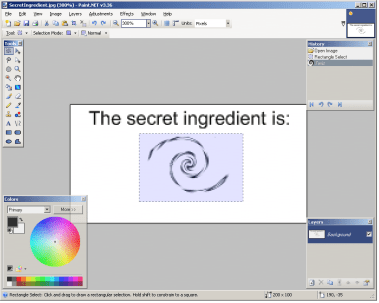
(I’ve zoomed in a bit to make it easier)
Now select Effects->Distort->Twist… from the menu and play around with the settings. Set the Amount/Direction to -30 and squint a bit, and we find out that the secret ingredient is…
…drum roll…

…not in here! Messing around with the image was a wild goose chase.
So, we’re still looking for something that looks like ciphertext. Where else could it be?
JPEG images (amongst others) can have EXIF metadata attached to them:
http://en.wikipedia.org/wiki/Exif
This is intended to be used to store things like the camera make/model, the settings in use when you took the picture, geotagging information, etc. If we load up the image in an EXIF editor or viewer, we can see what’s there. There’s an online version here:
This tells us that there are three EXIF fields:
Document Name Pmjeyeglwfh7F
Resolution 96 pixels/inch
Software Paint.NET v3.36
The document name looks a bit odd. Perhaps that’s our ciphertext?
If we proceed with the theory that Pmjeyeglwfh7F is the product of a Vigenere cipher, all we need is the key (or enough time to brute-force it!)
Fortunately, the key is provided in the message too:
“discretion is the key”
We can decrypt our ciphertext online here:
http://sharkysoft.com/misc/vigenere/
Put Pmjeyeglwfh7F into the Input box, use discretion as the key, and hit Decode. The result is:
Merchandise7X
…which is apparently the secret ingredient in a certain brand of soft
drink 🙂
Chris writes:
The twist was a very cool idea. Again, Alec’s blog is http://wirewatcher.wordpress.com. Tomorrow, I’ll reveal the winner of the challenge and his solution.
Here is the solution to the easy version of the Crypto Kitchen Packet Challenge from Alec R Waters (@alecrwaters on twitter). Thanks for the challenge Alec. By the way, Alec’s blog is http://wirewatcher.wordpress.com.
Alec writes:
Everything needed to discover the secret ingredient is in the email,
hidden in plain sight – all we have to do is look hard enough!
The first thing to notice is amongst the list of ingredients. The recipe
calls for:
“30 ml Balsamic vigenere”
“Vigenere”, huh? That’s not an ingredient, that’s a cipher!
Now we have to look for something that could be ciphertext. The most
likely thing is the Message-ID:
Message-ID: <Pmjeyeglwfh7F@i.eat.packets>
So our current theory is that Pmjeyeglwfh7F is the product of a Vigenere
cipher. All we need is the key (or enough time to brute-force it!)
Fortunately, the key is provided in the message too:
“discretion is the key”
Decrypting Pmjeyeglwfh7F using the Vigenere cipher and a key of
“discretion” gives us:
Merchandise7X
…which is apparently the secret ingredient in a certain brand of soft drink 🙂
Chris continues:
I’ll post the solution to the hard version tomorrow.
Filed under: Packet Challenge
Here’s another packet challenge for you guys. This one is courtesy of Alec R Waters (@alecrwaters on twitter). It’s called ‘The Crypto Kitchen.’ There is an easy and a hard version. I think you’ll all enjoy this one.
The capture file can be download from the I Smell Packets Google group located at the following URL:
http://groups.google.com/group/ismellpackets
The filenames are:
9-easy.pcap
9-hard.pcap
Send your answers to chris (dot) christianson (at) gmail (dot) com.
I wanted to share another solution I received to the ‘Where in The World is Chris?’ packet challenge. This one comes from Justin Acquaro.
Justin writes:
Short Answer:
Mohrenstrabe 30
10117 Berlin, Germany
The long answer:
Using wireshark it appears that the packet is a http session to twitter ( http://twitter/cchristianson )
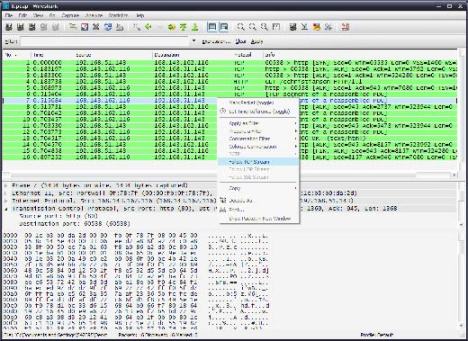
Follow the TCP stream shows this conversation followed by a GZIP download:
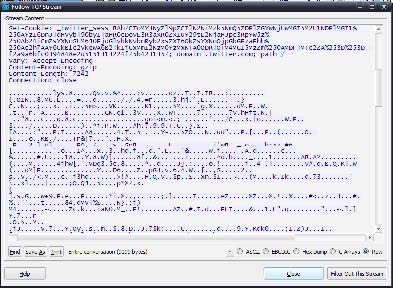
Using the save as function I save the file to packets.bin I then open packets.bin up in a hex editor (winHex). According to the RFC for gzip (http://tools.ietf.org/html/rfc1952) the start of a gzip file is always “1f 8b”. I then locate these two values in WinHex.

I then deleted all the data above this magic value and saved the results as packets.bin.gz

When I opened the file I was presented with the original contents.
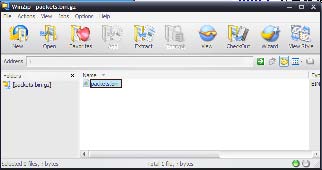
Opening the file up it appears to be the HTML source of a twitter page.
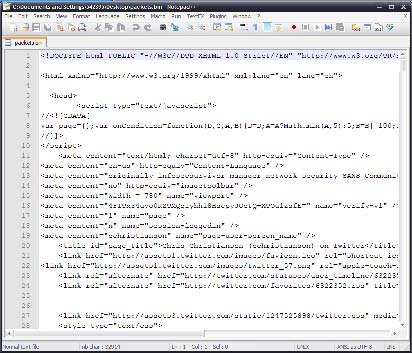
Rendering the HTML yields:

Which once plugged into google maps yields:

Chris writes:
Thanks for the write-up Justin (jacquaro on twitter.)
If anyone else would like share how they solved this or any of the other challenges, please feel free to send me a message. It’s always nice to see how others go about it.
I’m back from vacation. It was a blast! Where was I? Here is the solution to last week’s packet challenge.
Opening up the pcap file in Wireshark we see the following:

A quick glance at the fourth packet reveals that this is a HTTP request to twitter.com. Note that in the Packet List Pane the fourth packet has been selected. In the Packet Details Pane the Hypertext Transfer Protocol field section has been expanded. In particular, this is a request to twitter.com for /cchristianson.
Another thing to take note of, is that there is also only one connection or flow in this particular capture. We know this because there is only one set of IP addresses, source port, and destination port combonation. In this case, it’s the one from 192.168.51.143:60538 <-> 168.143.162.116:80.
Back to the question at hand, ‘where in the world is Chris?’ Most of us are familiar with Twitter. One of Twitter’s features is the ability for a user to update their Location. This Location field is displayed on every user’s page. In this instance, this field reveals exactly where I am.
Looking through all these packets for my location would be a little tedious. To assist us in our efforts to find the right packet, Wireshark does have a nifty little search feature. To access the Search feature, go to the Edit Menu and select Find Packet. Search for the string ‘Location’ in the ‘Packet Details’ like so:

This highlights the packet that contains my location. Selecting that packet and then expanding the Line-based text data: text/html section at the bottom, reveals all the content of the web page. Scrolling through that information will reveal the Location field as well as some numbers.

The numbers are of course GPS coordinates. Inserting those coordinates into Google Maps or any other mapping software will reveal my exact location at the time, the Hilton Hotel in Berlin. Berlin is fantastic by the way.
Lot’s of people got this one right. Congratulations to Jorge Orchilles (@jorgeorchilles on twitter) for being the first. Thanks to everyone else for playing and following along.
I’ll be in Las Vegas next week attending Blackhat and Defcon. Send me a tweet or an email if you’d like to meet.
Before I go, here is one of the pictures I took while I was there. It’s of the Brandenburg Gate in Berlin.

References:
The TCP/IP Guide
Wireshark User’s Guide
Brandenburg Gate
Filed under: Packet Challenge
Hello! I’m off on vacation, so I thought I’d post a quick packet challenge and let you try to find out where. The winner needs to answer the question, where in the world is Chris?
The capture file can be download from the I Smell Packets Google group located at the following URL:
http://groups.google.com/group/ismellpackets
The filename is:
8.pcap
Send your answers to chris (dot) christianson (at) gmail (dot) com.
Another day, another packet challenge. For this particular challenge I’m looking for 2 things:
1) Name the exploit that was used to compromise the system.
2) Tell me what was done to system after it was compromised.
Because of the number of packets in this challenge, I’ve decided to make the capture files available for download. While this means we won’t get to experience pure joy that comes from using a fine tool such as text2pcap, I’m sure no one would look forward to converting 60+ packets.
The capture file can be download from the I Smell Packets Google group located at the following URL:
http://groups.google.com/group/ismellpackets
The filename is:
7.pcap
Send you answers to chris (dot) christianson (at) gmail (dot) com.
I for one had a lot of fun with this week’s challenge. There were packets, magic, and even some shifting. Everything you need in a good packet challenge. Here’s the solution from the creator of the challenge Davy Douhine (@ddouhine on twitter.)
Davy writes:
1. Paste the packet in a text file.
2. Add “0000” at the beginning of each line, manually or with sed:
sed 's/^/0000 /' packet.txt
3. Print the result and copy it.
4. Launch scapy.
5. Import the packet in an object. To do this use the import_hexcap command, paste the packet, and hit CTRL-D:
>>> p1=IP(import_hexcap())
0000 4500 00c8 21c4 4000 8006 dee4 c0a8 3c01
0000 c0a8 3c35 0014 0841 ea5d efe1 32e0 3fa1
0000 5018 ffff 2c6d 0000 1f8b 0808 d92d 074a
0000 0203 6669 6c65 005d 8ecb 9104 210c 43ef
0000 1385 4210 fe01 e1b8 7ae8 fc43 1871 d8cb
0000 faa0 924b cf82 4812 6419 3aaa e5b4 2e8e
0000 81fd ec8d 87bd e00f c79f f344 767d 41a3
0000 098e 034f f31b 0c39 3f88 9e89 3a46 18dd
0000 af28 706f f8f0 82f7 5db7 d2d0 fc17 634c
0000 54d6 914c 43ed 72c4 532f 6a72 c329 4925
0000 48cb db9c 8564 2cc4 1baf b81c 7a5c cde9
0000 b7af f4b5 5882 c5f9 45c4 852e 62b1 3f3f
0000 c173 e305 f500 0000
6. Display the “p1” object:
>>> p1.display()
###[ IP ]###
  version= 4L
  ihl= 5L
  tos= 0x0
  len= 200
  id= 8644
  flags= DF
  frag= 0L
  ttl= 128
  proto= tcp
  chksum= 0xdee4
  src= 192.168.60.1
  dst= 192.168.60.53
  options= ''
###[ TCP ]###
     sport= ftp_data
     dport= 2113
     seq= 3932024801L
     ack= 853557153L
     dataofs= 5L
     reserved= 0L
     flags= PA
     window= 65535
     chksum= 0x2c6d
     urgptr= 0
     options= []
###[ Raw ]###
        load= '\x1f\x8b\x08\x08\xd9-\x07J\x02\x03file\x00]\x8e\xcb\x91\x04!\x0cC\xef\x13\x85B\x10\xfe\x01\xe1\xb8z\xe8\xfcC\x18q\xd8\xcb\xfa\xa0\x92K\xcf\x82H\x12d\x19:\xaa\xe5\xb4.\x8e\x81\xfd\xec\x8d\x87\xbd\xe0\x0f\xc7\x9f\xf3Dv}A\xa3\t\x8e\x03O\xf3\x1b\x0c9?\x88\x9e\x89:F\x18\xdd\xaf(po\xf8\xf0\x82\xf7]\xb7\xd2\xd0\xfc\x17cLT\xd6\x91LC\xedr\xc4S/jr\xc3)I%H\xcb\xdb\x9c\x85d,\xc4\x1b\xaf\xb8\x1cz\\\xcd\xe9\xb7\xaf\xf4\xb5X\x82\xc5\xf9E\xc4\x85.b\xb1??\xc1s\xe3\x05\xf5\x00\x00\x00'
7. We now have a good looking packet. The TCP source port indicates that this should be a ftp-data transfer. In the payload we see the string “file.” This is the name of the file that was transfered. Let’s take a closer look at it.
8. Display the payload of the packet:
>>> a.payload.payload
<Raw  load='\x08\x08\xd9-\x07J\x02\x03file\x00]\x8e\xcb\x91\x04!\x0cC\xef\x13\x85B\x10\xfe\x01\xe1\xb8z\xe8\xfcC\x18q\xd8\xcb\xfa\xa0\x92K\xcf\x82H\x12d\x19:\xaa\xe5\xb4.\x8e\x81\xfd\xec\x8d\x87\xbd\xe0\x0f\xc7\x9f\xf3Dv}A\xa3\t\x8e\x03O\xf3\x1b\x0c9?\x88\x9e\x89:F\x18\xdd\xaf(po\xf8\xf0\x82\xf7]\xb7\xd2\xd0\xfc\x17cLT\xd6\x91LC\xedr\xc4S/jr\xc3)I%H\xcb\xdb\x9c\x85d,\xc4\x1b\xaf\xb8\x1cz\\\xcd\xe9\xb7\xaf\xf4\xb5X\x82\xc5\xf9E\xc4\x85.b\xb1??\xc1s\xe3\x05\xf5\x00\x00\x00' |>
9. Convert the payload from raw to string and put the result in an object:
>>> strpayload=str(a.payload.payload)
'\x1f\x8b\x08\x08\xd9-\x07J\x02\x03file\x00]\x8e\xcb\x91\x04!\x0cC\xef\x13\x85B\x10\xfe\x01\xe1\xb8z\xe8\xfcC\x18q\xd8\xcb\xfa\xa0\x92K\xcf\x82H\x12d\x19:\xaa\xe5\xb4.\x8e\x81\xfd\xec\x8d\x87\xbd\xe0\x0f\xc7\x9f\xf3Dv}A\xa3\t\x8e\x03O\xf3\x1b\x0c9?\x88\x9e\x89:F\x18\xdd\xaf(po\xf8\xf0\x82\xf7]\xb7\xd2\xd0\xfc\x17cLT\xd6\x91LC\xedr\xc4S/jr\xc3)I%H\xcb\xdb\x9c\x85d,\xc4\x1b\xaf\xb8\x1cz\\\xcd\xe9\xb7\xaf\xf4\xb5X\x82\xc5\xf9E\xc4\x85.b\xb1??\xc1s\xe3\x05\xf5\x00\x00\x00'
10. Put it in a file:
>>> fd=open('/tmp/file', 'w')
>>> fd.write(strpayload)
>>> fd.close()
11. Use file magic to guess what sort of file it is:
>>> os.system('file /tmp/file')
/tmp/file: gzip compressed data, was "file", from Unix, max compression
12. It’s a gzip file, decompress it:
>>> fd=gzip.open('/tmp/file', 'r')
>>> fd.read()
'4500 0062 a46a 0000 8011 9c99 c0a8 3c01 c0a8 3c35 5a6d 0202 004e 3523 3c31 353e 4a75 6e20 2033 2031 333a 3136 3a31 3920 4444 4444 4444 4444 2047 656e 6572 6963 4c6f 6709 3009 5657 5253 2056 5048 4f4f 4c51 4a20 5344 464e 4857 2053 4f48 4456 480a\n'
13. So we have a text file with some hex in it that begins with “45…”. Oh no, it’s another packet… 😉 Let’s format it so that it can be imported into scapy. This requires 16 bytes per line with 0000 at the beginning of each. Question for the audience. Does anybody know how to do this in python?
>>> extractedpacket=_
>>> fd.close()
>>> fd=open('/tmp/extpkt', 'w')
>>> fd.write(extractedpacket)
>>> fd.close()
>>> os.system('vi /tmp/extpkt')
>>> os.system("sed 's/^/0000 /' /tmp/extpkt")
0000 4500 0062 a46a 0000 8011 9c99 c0a8 3c01
0000 c0a8 3c35 5a6d 0202 004e 3523 3c31 353e
0000 4a75 6e20 2033 2031 333a 3136 3a31 3920
0000 4444 4444 4444 4444 2047 656e 6572 6963
0000 4c6f 6709 3009 5657 5253 2056 5048 4f4f
0000 4c51 4a20 5344 464e 4857 2053 4f48 4456
0000 480a
14. Import the packet to scapy using import_hexcap:
>>> p2=IP(import_hexcap())
0000 4500 0062 a46a 0000 8011 9c99 c0a8 3c01
0000 c0a8 3c35 5a6d 0202 004e 3523 3c31 353e
0000 4a75 6e20 2033 2031 333a 3136 3a31 3920
0000 4444 4444 4444 4444 2047 656e 6572 6963
0000 4c6f 6709 3009 5657 5253 2056 5048 4f4f
0000 4c51 4a20 5344 464e 4857 2053 4f48 4456
0000 480a
15. Display the packet details:
>>> p2.display()
###[ IP ]###
  version= 4L
  ihl= 5L
  tos= 0x0
  len= 98
  id= 42090
  flags=
  frag= 0L
  ttl= 128
  proto= udp
  chksum= 0x9c99
  src= 192.168.60.1
  dst= 192.168.60.53
  options= ''
###[ UDP ]###
     sport= 23149
     dport= syslog
     len= 78
     chksum= 0x3523
###[ Raw ]###
        load= 'Jun  3 13:16:19 DDDDDDDD GenericLog\t0\tVWRS VPHOOLQJ SDFNHW SOHDVH\n'
16. We now have a packet containing a syslog message and there are some weird characters in it, “VWRS VPHOOLQJ SDFNHW SOHDVH”.
17. What was the name of that challenge? Caesar’s challenge… hmm… After a quick search we find something called the Caesar cipher. The Caesar cipher is a 2000 year old encryption technique named after Julius Caesar. It is a type of substitution cipher that shifts the characters 3 places.
18. Let’s try it. Shifting the characters in the syslog message by 3 we get: “STOP SMELLING PACKET PLEASE”.
Chris adds:
Thanks to Davy for coming up this week’s challenge. It was fun for me to have the opportunity to work on a challenge for once. If anyone else ever has an idea, let me know and maybe we’ll post it.
Lot’s of people got this one right. Congratulations to Alec Waters (@alecwaters on twitter) for being the first. Thanks to everyone else for playing.
Until next time.
The following are some links to more information about this week’s challenge:
Magic number (programming)
file (Unix)
Caesar cipher
 I Smell Packets